Free Blogger Templates :

facewoman
Ayo berikan dukungan dan semangan anda kepada kami hanya dengan like page Tutor | Blog™ agar tetap terus Maju.

Blogger Template Designer Now Available on Blogger.com

Jumat, 11 Juni 2010 | 0 komentar

Actually Blogger has launched its beta testing of Blogger Template designer at March 2010. So we can access it only from draft.blogger.com

Finally, at this June 2010 Blogger Template Designer has officially launched for everyone. Open your dashboard and you can find Design menu.

What we can do with this new blogger template designer?

  • Beautiful new templates. Blogger have designed 19 brand-new templates, with more on the way. You can quickly give your blog a great new style by selecting one of the new templates.[1]
  • Separating design from layout. Designs are completely defined in CSS (Cascading Style Sheets), meaning that any design can be applied to any blog layout, making templates more flexible and unique.
  • Hundreds of free, professional background images. We've paired up with iStockphoto to offer you hundreds of gorgeous background images at no cost.
  • A single control to change all your design's colors. With other platforms, users have to define every color in their blog separately, making changing the color theme of your blog a tedious task. The Blogger Template Designer lets you change all the colors in your blog at once, by changing the Main color theme.
  • Pixel-perfect layout manipulation via smooth resizing. You can define your layout down to the pixel via sliders that update the blog's preview in real time.
  • A real-time preview sits below the design control panel. Watch your blog update as you create your template design.
  • Keeping it simple. Throughout the Template Designer we use hierarchy to hide complexity from you.
  • Complete control. Under the advanced tab, you can override a design's CSS and enter your own CSS in the editor and see your blog's preview updated in real time.
  • Cross-browser support. Blogger handles cross browser support for you, so you don’t have to. Want a design with rounded corners? We give it to you in Firefox, Internet Explorer, and Chrome.


Source : Blogger Buzz

[1] Note: Selecting a new template will erase all of your customizations on the existing template, so if you have customized your template be sure to first save the current template at Design > Edit HTML click on Download Full template

Where I Can Find Suitable Website Templates

| 0 komentar

Website templates are considered as pre designed websites. It is a very easy guide to start your own website. You will have to add the personal content only and you can easily start having your own website. Various types of website templates are available on the Internet and you can choose the one suitable for your website subject.

There are website templates for gaming website or professional photography, hair salon or say fashion related website. You can also create flash in your website with the help of website templates. Another advantage of adding the free website templates is that they have all been coded in CSS. There is no need to place the link of the website from where you have taken the templates.

These absolutely customizable website are always ready for use as they can be easily downloaded at any time. If you want to set up an online store, then you can also get many websites offering ecommerce templates. These ecommerce templates are compatible with almost all the hosting companies and they can be used for all sorts of business. Some of the websites sell these website templates for free, while some take a small charge for it.

How to Use Google Font API on Blog CSS?

Selasa, 25 Mei 2010 | 0 komentar

What is Google Font API? The Google Font API helps you add web fonts to any web page. It means you dont need to install font family on your desktop computer to see custom font on any web.
Benefits of the Google Font API include:
  • A choice of high quality open source fonts.
  • Works in most browsers.
  • Extremely easy to use.
For example, the following text uses a web font called Tangerine:


We can apply this font on web without install it on our PC, even our visitor can see it because we use font and script from Google Directory.

Yes, Google have created Google Font Directory. There we can browse this catalog of available fonts, learn about the font designers who created them, and copy the code required to use them on our web page. The fonts in the directory are all released under open source licenses; you can use them on any non-commercial or commercial project.


Now, we can use this unique font on our website or blog. How to use Google Font API ? For reference, you can read this Quick Start example or follow this example.

Step 1
Open Layout>Edit HTML. Add a stylesheet link to request the desired web font(s). Copy these code and paste after <head> code


Note : Change Font name as your desire or you can pick this code from Google Font Directory. For exampale if you want to use Yanone Kaffeesatz font, go to Google font directory, click on font type, then click on Get Code.


Step 2
Insert CSS code
font-family: 'Yanone Kaffeesatz', arial, serif;

You can insert it wherever you want. For example you want use that font for Post title, so insert it after
.post h3 {

or you want to use it as global font so insert it after
body{

etc.

I try to use custom font for my post title as you can see it. I think this is a great idea especially for everyone who concern on blog design and appearance. Thanks Google.

Improved Post Preview Blogger in Draft

Senin, 17 Mei 2010 | 0 komentar

Usually we preview our posts before hit publish. We want to see how it looks, it was good or still needs to be fixed? Blogger in Draft now supports a new improved preview That feature allows you to see how your post will from actually look to your readers.

This is a preview of the new beta testing, so you Should http://draft.blogger.com to log in to write or try a new post preview. On the New Post page, click on the Preview button, and you will of see a new window open with the WYSIWYG (What You See Is What You Get) preview of the post. This is how your blog post to your readers will from Appear Pls you publish, with The Same format and style of your current theme Blogger. And to host the blog you can check out some plan under blog
hosting
.


Note That the preview page does not automatically updated as the contents of the post changes. To make sure the post looks OK after you've done further editing, you can manually refresh the preview page, or click the Preview button again.

(Source: Blogger in Draft)

Twitter Background Gallery

Jumat, 14 Mei 2010 | 0 komentar

No day without tweeting? Do you addicted to Twitter? Need a personal looks of your Twitter profile? Usually we really frustate because we have no skill to design . Don't worry, there are so many free Twitter background can inspire us.


Twitter Background Gallery, showcasing more than a thousand of Twitter background. Twitter Backgrounds Gallery is the largest showcase of unique Twitter backgrounds submitted and recommended by Twitter users worldwide. Get inspired, vote for your favorites, find a designer or DIY resources and most importantly - have fun! Proud of your own twitter background? Submit it to the gallery.

10 Things I Knew When I Started Blogging

| 0 komentar

You want to become a professional blogger, make loads of money and have the good life. All these guys do is write for a living, right? They spend a couple hours a week to put up a few blog posts and their readers are just itching for more. These bloggers are following the ten blogging commandments.

1. Have passion about your topic

You want to write something that you would read. If you're constantly reading about sports, why not make a sports blog? The right topic is one that you are passionate about. Readers always have room for one more blog if it's well written and from the heart.

2. Be consistent with your topic

You are drawing on a canvas when you write new posts. If you are painting with subdued blues and greens, it is jarring to suddenly switch over to fluorescent fuchsia. Likewise is you suddenly talk about religion on your weight loss journal.

3. Respond to comments

Comments provide that extra personalization to the blog. They can sometimes expound upon the topic. They can provide the forum for some great discussions and further blog posts. Give them a response and be thankful that people are reading.

4. Search for blogs you like

Chances are, there are blogs that you have been keeping up with for ages. What keeps you going back? Is it the writer's style and ego? Is it the way that the blogger loves peaches just like you? Place your own spin on the things you like about these sites.

5. Have an ironclad ego

You can't take comments personally. You wanted your blog to inspire passion, and it has. Remember that the angry commenters may be having a bad day and want to take it out anonymously on those around them.

6. Be a stickler for your posting schedule

Following a posting schedule is paramount to retaining readers. It's better if you write it in your profile 'Every Tuesday and Friday, … brings us into the world of great cheese,' but it should be followed. Essentially, you do not want to give your readers any reasons to stray.

7. Invest in a good design

You have about thirty seconds to make a great impression on a reader who is cruising for new blogs. Anything that makes a blog harder to read, from loud wallpapers to busy animations, drives visitors away instead of attracting them.

8. Be the one in charge

When it comes down to it, you're the one who's writing. You are the one in charge, not the commenters. They may be the ones who offer advice, but you're steering the ship.

9. Market your blog

You would read your blog because it offers the best advice in your favorite topic. Why not let other people know about it through advertising?

10. Invest a lot of time in your blog

Everything you do to improve your blog takes time. You need to do research into the new trends. You need to look into the new marketing techniques. You need to brush up on comma usage. A great blog takes time and does not come out of thin air.

I wish that I had these commandments when I first started blogging. I wish that I'd known how much time it takes to do research and keep up with marketing. I wish that I had known I'd be in charge of the marketing, because I thought that there was a magic visitor button to make traffic run to my site. Following these tips will help you incrementally improve traffic to your blog, and that is how real success is born.

Guest Author:
James Adams works with the team at CartridgeSave where he reviews products such as the HP 336 ink cartridge and helps out on their blog.

Convert Bitmap to Vector Service

Senin, 10 Mei 2010 | 0 komentar

What is vector graphic? Vector graphics is the use of geometrical primitives such as points, lines, curves, and shapes or polygon(s), which are all based on mathematical equations, to represent images in computer graphics (Source : Wikipedia)

Humm..such a theoritical definition isn't it. It's easier to see image below.


Example showing effect of vector graphics versus raster graphics. The original vector-based illustration is at the left. The upper-right image illustrates magnification of 90x as a vector image. The lower-right image illustrates the same magnification as a bitmap image. Raster images are based on pixels and thus scale with loss of clarity, while vector-based images can be scaled indefinitely without degrading quality.

Do you have a bitmap image? You want to resize, rescale it? Of course, bitmap/raster graphic quality will degrade. So you need to vectorize it. Check this example below.


Image above is taken from photograph. Custom vector service can change into another character. Look at the right image. It's look different with the left photograph. It's looks nice.

Or do you want to vectorize your own photograph?


Check this detailed Lady Gaga vector graphics.


Have no skill to do that? You can ask Ndopart.com , provide bitmap to vector service. Just contact him at his blog here

Mother's Day Gift Design Idea

Rabu, 28 April 2010 | 0 komentar

Mothers day is coming soon. Would you like to give something special for your mother? Is there any mothers day gift ideas? Maybe I can give you a little Mother's Day gift idea. If you love to design your own, you can design lovely text special for your mom, or funny baby animal, flower, etc. But if you just want an instant gift with beautiful design, these can be your choice.

Love Cake*Mother's Day Totebag


An affordable, environment friendly tote! Great for carrying books or groceries. Slim design allows for easy storage. 100% cotton, reinforced stitching on handles. Dimensions: 20"w x14.5"h x4.5"d.


We Love Mom Mother's Day Mug


The classic white mug is perfect for any photos or designs. A blank canvas for your creativity. A large handle makes it easy to hold. 11 oz. or 15 oz. Dishwasher and microwave safe. Imported.


World's Best Mom Mug


A truly unique mug. When it’s cold, it’s just a simple black mug. When you add any hot beverage (water, tea, coffee, etc.), your image comes to life in vibrant colors. 11 oz. Handwash only. Imported.

21 Interesting Websites Powered by Blogger

| 1komentar

With Blogger making the ability to get noticed on the web available to just about anyone who wants to take a spare couple of minutes to investigate the site and follow their quick and simple steps to get started, there is no lack for interesting sites powered by Blogger. From personal finance to personal journeys and interior design to web trends, there is plenty of variety, but quality may vary widely by content and design. Here are a few interesting websites powered by Blogger you might want to browse through though.

1. Abby’s Blog


It can be intensely interesting to follow the travels of another. With over 5700 followers, Abby seems to have drawn the attention of many, and for good reason. She is attempting to be the youngest person to sail around the globe solo.

2. The Green Riders


Join siblings Catherine and Oliver as they travel cross-country on their electric bikes in an effort to explore the “sustainability heroes” nationwide. Sounds like it could turn out to be one interesting journey!

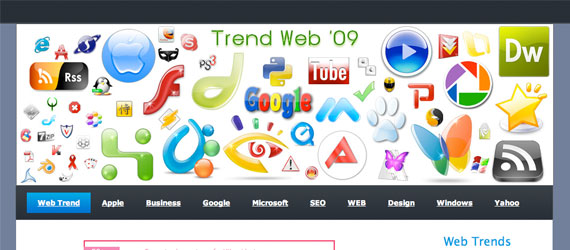
3. Trend Web


If you are searching Blogger for a site related to web trends, this could be a great place to begin.

4. Trendever


In keeping with the ‘trends’ theme, Trendever takes a look at trends related to the car industry.

5. Into the Abyss


If you’re looking for posts about “horror, movies, indy filmmaking, digital technology and general weird stuff” then Todd Miro’s site could be perfect for you.

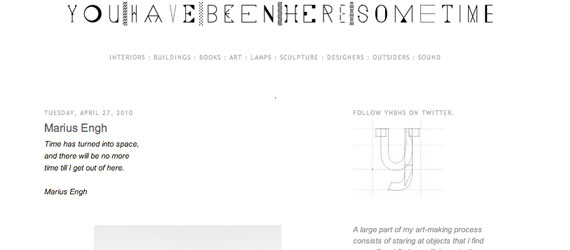
6. You Have Been Here Some Time


If you are into design, this could be a great site to check out. From hotel, restaurant, and interior design, to art, books, photography, ceramics, and more, there is plenty to sink your design teeth into here.

7. The House in Marrakesh


Ever wondered what life in Morocco might be like? If not, there are thousands of people who have. Take a peek at some beautiful pictures that may give you a better insight into life within this mysterious country.

8. Quest for Animation Glory


If you’re a frustrated artist or just someone who’s looking for a little inspiration, you might want to check out Vince Gorman’s blog site.

9. Madame Lamb


This is one of those blogs you might just have to visit to get a good feel for. Cool articles, cool interviews, cool art, cool film, cool fashion…guess you probably get the picture.

10. The Penny-Wise Provider


This up-and-comer site may not be the most popular yet, but it offers up some interesting tips, techniques, views, and opinions for those of you searching for more “Efficient, Effective, and Economical Living”.

11. Magic Carpet Burn


Great stuff for all things monsters -- mainly retro-style monsters (think Godzilla, The Munsters, and similarly funky features from that era). There is a ton of links here to similar and related sites as well.

12. Serendipitous


A more relaxed site, Serendipitous is founder Chris’s efforts to snap photos of things that have an impact upon her and share her thoughts regarding these items with the world.

13. Stephen’s Digital Photo Gallery


If you’re into digital painting, this blog site might be one to take a look at. This is Stephen Sitton’s blog, showcasing his work done with Adobe Photoshop CS4.

14. TechLayers: Tyler Romeo’s Weblog


If you’re looking for a site relating to opinions on technology and social media then “TechLayers: Tyler Romeo’s Weblog” might be a good site at which to start.

15. Losfornia


If you want to keep up with what’s happening in LA, you might want to take a peek at Losfornia.blogspot.com. From Hollywood to history, architecture to music, you may find something that hits your fancy here.

16. Archiquality


This is a great site for the modern architecture enthusiast. Plenty of dazzling photographs and just a plain neat blog.

17. Hyperboleandahalf


See what amazing creations can come from a creative mind using Paintbrush.

18. Gourmet Food Lovers


Gourmet food might be “Greek” to you, so get your online translator ready for this site!

19. Nation health


For those interested in their health, Nation Health could be the Blogger powered site for which you’ve been searching for.

20. Mud Flap Bubbas


This site is hosted by a city girl who has moved to the country and describes herself as, “Bitter. Jaded. Cynical.” Need you read more? Then visit the site.

21. The Best Guide


If you’re looking for a good site for travel information on Blogger, you might want to take a stop in at “The Best Guide”.

Author : James Adams is a blogger and designer working with an online supplier of toner next day. He also contributes about art, advertising and design to their blog.

Cute and Fancy Design Online Store

Kamis, 15 April 2010 | 0 komentar

Long time no see. It's about a month I didn't create any new template. I was prepared for my online store, such a cute and fancy design. You can get various personal product as a gift. I choose Zazzle.com as my online store.

This April, we celebrate Earth day. I also offer fancy shirt, mug, card, appron with Earth Day theme.


And next May, Mother's Day will come. Wanna give a special gift for your lovely Mom in this special Mother's Day? You can consider these cute stuff as a gift.


If you interested in, it would be nice to go to my online store, pick a design and product. Happy shopping.
 
Support : Free Blog Templates | Free GPRS lt
Copyright © 2012. Tutor | Blog™ - All Rights Reserved
Proudly powered by Free Blog Template
Contact @ FREE GPRS LT