Free Blogger Templates :

facewoman
Ayo berikan dukungan dan semangan anda kepada kami hanya dengan like page Tutor | Blog™ agar tetap terus Maju.
Tampilkan postingan dengan label Magazine. Tampilkan semua postingan

Black Ads Ready Magazine Template

Selasa, 07 Juni 2011 | 0 komentar

Some people are blogging for sharing experience, hobby, story, and another personal thing so they tend to choose personal blog template. Another people are blogging for make money online by joining Adsense program.

Create a high quality content blog, design adsense ready theme/template, and attract your visitor. You need simple and clean blogger template to optimize ads placement. Me and my friend have created simple black ads ready template, suitable for make money online blog.


PREVIEW | DOWNLOAD


We have considered 4 placements of ads, for illustration you can check the demo blog.
Right header you can put the largest horizontal size Adsense 728x90
Inside post you can put 300x300 or another rectangle large size
Left sidebar you can put vertical adsense size
Right sidebar you can put 250x250 ads size.

The clean dark background ease you to adjust Adsense color.

White Clean Magazine

Minggu, 22 November 2009 | 0 komentar

Introducing new template for business blog. This template designed 3 columns, ads ready, simple, not heavy load. You can set your ads on sidebar, header right, and also 125x125 banner ads.


For complete installation setting go to author's site.
-------------------------------------------------
THE CONTENTS OF THIS TEMPLATE IS MADE BY CEBONG IPIET.
PLEASE BE RESPECTFUL AND DO NOT REMOVE CREDIT FOOTER LINK WITHOUT MY PERMISSION.
YOU ARE ALLOWED TO DISTRIBUTE BUT NOT ALLOWED TO ADD ANY LINK ON FOOTER

Fashionzine Pink

Kamis, 22 Oktober 2009 | 0 komentar

Fashionzine blogger template, dedicated for fashion and style blog. 3 columns, clean, pink and ads ready suits your fashion magazine blog.
Features :
  • Ads ready
  • Tweet meme button
  • Bookmarks button
Thanks to Bie Blogger Template for all contributions.


Installation Setting

Header Image
You can customize image header, edit through page element, click on header widget and upload your own image header

Right Header Widget
You can put your ads code here. Simply paste adsense code and save. If you dont have adsense account, you can put banner ads or any HTML code here

Banner Ads
Click on Ads Banner gadget
Paste these code

<div id="adspot">
<!-- Ad1 start -->
<a class="ad1" href="http://your-URL"><img src="https://blogger.googleusercontent.com/img/b/R29vZ2xl/AVvXsEg296g-bygnA338gAPtJLXOFdC0-4WnKOI-hz8-P_rAGf1jrKQ3vHNLuazZzk2KF9FUTTmdt94yoWYQoHO4sFJra4ezGkrtHac5dA2-XVTnOwuQAdk7v8nAg-P-0HyHhYUvY0v_zOd4Z8-O/s1600/themeforest.jpg" /></a>
<!-- Ad2 start -->
<a class="ad2" href="http://your-URL"><img src="https://blogger.googleusercontent.com/img/b/R29vZ2xl/AVvXsEg296g-bygnA338gAPtJLXOFdC0-4WnKOI-hz8-P_rAGf1jrKQ3vHNLuazZzk2KF9FUTTmdt94yoWYQoHO4sFJra4ezGkrtHac5dA2-XVTnOwuQAdk7v8nAg-P-0HyHhYUvY0v_zOd4Z8-O/s1600/themeforest.jpg" /></a>
<!-- Ad3 start -->
<a class="ad3" href="http://your-URL"><img src="https://blogger.googleusercontent.com/img/b/R29vZ2xl/AVvXsEg296g-bygnA338gAPtJLXOFdC0-4WnKOI-hz8-P_rAGf1jrKQ3vHNLuazZzk2KF9FUTTmdt94yoWYQoHO4sFJra4ezGkrtHac5dA2-XVTnOwuQAdk7v8nAg-P-0HyHhYUvY0v_zOd4Z8-O/s1600/themeforest.jpg" /></a>
<!-- Ad4 start -->
<a class="ad4" href="http://your-URL"><img src="https://blogger.googleusercontent.com/img/b/R29vZ2xl/AVvXsEg296g-bygnA338gAPtJLXOFdC0-4WnKOI-hz8-P_rAGf1jrKQ3vHNLuazZzk2KF9FUTTmdt94yoWYQoHO4sFJra4ezGkrtHac5dA2-XVTnOwuQAdk7v8nAg-P-0HyHhYUvY0v_zOd4Z8-O/s1600/themeforest.jpg" /></a>
<div class="clearer">
</div></div>

Note : change http://your-URL to your own URL, and https://blogger.googleusercontent.com/img/b/R29vZ2xl/AVvXsEg296g-bygnA338gAPtJLXOFdC0-4WnKOI-hz8-P_rAGf1jrKQ3vHNLuazZzk2KF9FUTTmdt94yoWYQoHO4sFJra4ezGkrtHac5dA2-XVTnOwuQAdk7v8nAg-P-0HyHhYUvY0v_zOd4Z8-O/s1600/themeforest.jpg to your own URL image
If you dont need these gadget, just click remove


Twitter Gadget (under main blog)
Click on Twitter Gadget
Paste these code

<div class="twitter"><ul id="twitter_update_list"></ul>
<a id="twitter-link" style="display: block; text-align: right;" href="http://twitter.com/bietemplates">follow me on Twitter</a>
</div>
<script src="http://twitter.com/javascripts/blogger.js" type="text/javascript"></script>
<script src="http://twitter.com/statuses/user_timeline/bietemplates.json?callback=twitterCallback2&amp;count=2" type="text/javascript"></script>

Note : change red text to your own Twitter ID

Author on Post
Open Edit HTML
Click on expand widget template
Find and edit these code

<div class='authorbio'>
<div class='title'>
About The Author</div>
<div style='float: left;'>
<img alt='' src='https://blogger.googleusercontent.com/img/b/R29vZ2xl/AVvXsEjegaW1b0ZsnbO3SUAYjZACgsAtSznrtSwyvPKMaBd0RUjC7ZApcSzNMXbZWBo_zCjbTyqO8B83ghmVwhgh7ARev-niL3bdCYGUBq3-cTNF-Ixebi4aOSzVi-TJS7UrsVPk8eY4-lScj_Ya/s1600/profile_blank_gray.jpg'/>
</div>

Bie, that&#39;s my name. Im just an ordinary blogger.Ea eam labores imperdiet, apeirian democritum ei nam, doming neglegentur ad vis. Ne malorum ceteros feugait quo, ius ea liber offendit placerat, est habemus aliquyam legendos id. Eam no corpora maluisset definitiones.
</div>

Note :
Replace this "https://blogger.googleusercontent.com/img/b/R29vZ2xl/AVvXsEjegaW1b0ZsnbO3SUAYjZACgsAtSznrtSwyvPKMaBd0RUjC7ZApcSzNMXbZWBo_zCjbTyqO8B83ghmVwhgh7ARev-niL3bdCYGUBq3-cTNF-Ixebi4aOSzVi-TJS7UrsVPk8eY4-lScj_Ya/s1600/profile_blank_gray.jpg" with your own URL image

Replace description, to your own description

Navigation Menu
Open Edit HTML, find and edit navigation menu


Pass 000-152 exam with promising score! We offer self paced 156-315.65 training program to help candidates pass 412-79 exam on first try.

BeMagazine

Senin, 12 Oktober 2009 | 0 komentar

Bemagazine blogger template, has four column with minipost layouts, suitable for business blog.
Features :
  • Ads ready
  • Tweet meme button
  • Bookmarks button
  • RSS Subscribe button


Installation Setting

Header Image
You can customize image header, edit through page element, click on header widget and upload your own image header

Right Header Widget
You can put your ads code here. Simply paste adsense code and save. If you dont have adsense account, you can put banner ads or any HTML code here

Banner Ads
Click on Ads Banner gadget
Paste these code

<div id="adspot">
<!-- Ad1 start -->
<a class="ad1" href="http://www.blogger.com/post-create.g?blogID=621888188245502678#"><img src="https://blogger.googleusercontent.com/img/b/R29vZ2xl/AVvXsEg296g-bygnA338gAPtJLXOFdC0-4WnKOI-hz8-P_rAGf1jrKQ3vHNLuazZzk2KF9FUTTmdt94yoWYQoHO4sFJra4ezGkrtHac5dA2-XVTnOwuQAdk7v8nAg-P-0HyHhYUvY0v_zOd4Z8-O/s1600/themeforest.jpg" /></a>
<!-- Ad2 start -->
<a class="ad2" href="http://www.blogger.com/post-create.g?blogID=621888188245502678#"><img src="https://blogger.googleusercontent.com/img/b/R29vZ2xl/AVvXsEg296g-bygnA338gAPtJLXOFdC0-4WnKOI-hz8-P_rAGf1jrKQ3vHNLuazZzk2KF9FUTTmdt94yoWYQoHO4sFJra4ezGkrtHac5dA2-XVTnOwuQAdk7v8nAg-P-0HyHhYUvY0v_zOd4Z8-O/s1600/themeforest.jpg" /></a>
<!-- Ad3 start -->
<a class="ad3" href="http://www.blogger.com/post-create.g?blogID=621888188245502678#"><img src="https://blogger.googleusercontent.com/img/b/R29vZ2xl/AVvXsEg296g-bygnA338gAPtJLXOFdC0-4WnKOI-hz8-P_rAGf1jrKQ3vHNLuazZzk2KF9FUTTmdt94yoWYQoHO4sFJra4ezGkrtHac5dA2-XVTnOwuQAdk7v8nAg-P-0HyHhYUvY0v_zOd4Z8-O/s1600/themeforest.jpg" /></a>
<!-- Ad4 start -->
<a class="ad4" href="http://www.blogger.com/post-create.g?blogID=621888188245502678#"><img src="https://blogger.googleusercontent.com/img/b/R29vZ2xl/AVvXsEg296g-bygnA338gAPtJLXOFdC0-4WnKOI-hz8-P_rAGf1jrKQ3vHNLuazZzk2KF9FUTTmdt94yoWYQoHO4sFJra4ezGkrtHac5dA2-XVTnOwuQAdk7v8nAg-P-0HyHhYUvY0v_zOd4Z8-O/s1600/themeforest.jpg" /></a>
<div class="clearer">
</div></div>

Note : change # to your own URL, and https://blogger.googleusercontent.com/img/b/R29vZ2xl/AVvXsEg296g-bygnA338gAPtJLXOFdC0-4WnKOI-hz8-P_rAGf1jrKQ3vHNLuazZzk2KF9FUTTmdt94yoWYQoHO4sFJra4ezGkrtHac5dA2-XVTnOwuQAdk7v8nAg-P-0HyHhYUvY0v_zOd4Z8-O/s1600/themeforest.jpg to your own URL image
If you dont need these gadget, just click remove

Search Form Code
<div id='search'>
<form action='/search' id='searchform' method='get'>
<input id='s' name='q' type='text' value=''/>
<input id='searchsubmit' type='submit' value=''/>
</form>
</div>

RSS Subscribe on Post
Open Edit HTML
Click on expand widget template
Find and edit these code

<div class='subs'>
<div class='title'>Subscribe Here</div>
<center>
<form action='http://feedburner.google.com/fb/a/mailverify' id='feedform' method='post' onsubmit='window.open(&apos;http://feedburner.google.com/fb/a/mailverify?uri=bietemplates&apos;, &apos;popupwindow&apos;, &apos;scrollbars=yes,width=550,height=520&apos;);return true' target='popupwindow'>
<input class='textarea' name='email' onblur='if (this.value == &apos;&apos;) {this.value = &apos;Enter email address here&apos;;}' onfocus='if (this.value == &apos;Enter email address here&apos;) {this.value = &apos;&apos;;}' type='text' value='Enter email address here'/><br/>
<input name='uri' type='hidden' value='camelgraph'/> <input name='title' type='hidden' value='54800'/> <input name='loc' type='hidden' value='en_US'/>
</form>

<p><a href='http://feeds2.feedburner.com/bietemplates'><img alt='' height='26' src='http://feeds2.feedburner.com/~fc/bietemplates?bg=8eca2c&amp;fg=ffffff&amp;anim=1' style='border:0' width='88'/></a></p></center>
</div>

Note : Change red text to your own feedburner ID


Navigation Menu
Open Edit HTML, find and edit navigation menu

-------------------------------------------------
THE CONTENTS OF THIS TEMPLATE IS MADE BY CEBONG IPIET.
PLEASE BE RESPECTFUL AND DO NOT REMOVE CREDIT FOOTER LINK WITHOUT MY PERMISSION.
YOU ARE ALLOWED TO DISTRIBUTE BUT NOT ALLOWED TO ADD ANY LINK ON FOOTER

Dark Folioz

Minggu, 11 Oktober 2009 | 0 komentar

Long time no see ^_^
Introducing my ( & my friend from www.bietemplates.com) blogger template design. Dark folioz blogger template, designed multi featured.

Description
Dark Folioz Blogger template features
  • Ads ready
  • Automatic readmore and thumbnail
  • Author profile
  • Twitter update
  • Tweet meme button
  • Share and bookmarks button
  • RSS Subscribe
  • many more

Installation Setting


Header Image
You can customize image header, edit through page element, click on header widget and upload your own image header

Right Header Widget
You can put your ads code here. Simply paste adsense code and save. If you dont have adsense account, you can put banner ads or any HTML code here

Banner Ads
Click on Ads Banner gadget
Paste these code

<div id="adspot">
<!-- Ad1 start -->
<a class="ad1" href="http://www.blogger.com/post-create.g?blogID=621888188245502678#"><img src="https://blogger.googleusercontent.com/img/b/R29vZ2xl/AVvXsEg296g-bygnA338gAPtJLXOFdC0-4WnKOI-hz8-P_rAGf1jrKQ3vHNLuazZzk2KF9FUTTmdt94yoWYQoHO4sFJra4ezGkrtHac5dA2-XVTnOwuQAdk7v8nAg-P-0HyHhYUvY0v_zOd4Z8-O/s1600/themeforest.jpg" /></a>
<!-- Ad2 start -->
<a class="ad2" href="http://www.blogger.com/post-create.g?blogID=621888188245502678#"><img src="https://blogger.googleusercontent.com/img/b/R29vZ2xl/AVvXsEg296g-bygnA338gAPtJLXOFdC0-4WnKOI-hz8-P_rAGf1jrKQ3vHNLuazZzk2KF9FUTTmdt94yoWYQoHO4sFJra4ezGkrtHac5dA2-XVTnOwuQAdk7v8nAg-P-0HyHhYUvY0v_zOd4Z8-O/s1600/themeforest.jpg" /></a>
<!-- Ad3 start -->
<a class="ad3" href="http://www.blogger.com/post-create.g?blogID=621888188245502678#"><img src="https://blogger.googleusercontent.com/img/b/R29vZ2xl/AVvXsEg296g-bygnA338gAPtJLXOFdC0-4WnKOI-hz8-P_rAGf1jrKQ3vHNLuazZzk2KF9FUTTmdt94yoWYQoHO4sFJra4ezGkrtHac5dA2-XVTnOwuQAdk7v8nAg-P-0HyHhYUvY0v_zOd4Z8-O/s1600/themeforest.jpg" /></a>
<!-- Ad4 start -->
<a class="ad4" href="http://www.blogger.com/post-create.g?blogID=621888188245502678#"><img src="https://blogger.googleusercontent.com/img/b/R29vZ2xl/AVvXsEg296g-bygnA338gAPtJLXOFdC0-4WnKOI-hz8-P_rAGf1jrKQ3vHNLuazZzk2KF9FUTTmdt94yoWYQoHO4sFJra4ezGkrtHac5dA2-XVTnOwuQAdk7v8nAg-P-0HyHhYUvY0v_zOd4Z8-O/s1600/themeforest.jpg" /></a>
<div class="clearer">
</div></div>

Note : change # to your own URL, and https://blogger.googleusercontent.com/img/b/R29vZ2xl/AVvXsEg296g-bygnA338gAPtJLXOFdC0-4WnKOI-hz8-P_rAGf1jrKQ3vHNLuazZzk2KF9FUTTmdt94yoWYQoHO4sFJra4ezGkrtHac5dA2-XVTnOwuQAdk7v8nAg-P-0HyHhYUvY0v_zOd4Z8-O/s1600/themeforest.jpg to your own URL image
If you dont need these gadget, just click remove

Twitter Gadget (under main blog)
Click on Twitter Gadget
Paste these code

<div class="twitter"><ul id="twitter_update_list"></ul>
<a id="twitter-link" style="display: block; text-align: right;" href="http://twitter.com/bietemplates">follow me on Twitter</a>
</div>
<script src="http://twitter.com/javascripts/blogger.js" type="text/javascript"></script>
<script src="http://twitter.com/statuses/user_timeline/bietemplates.json?callback=twitterCallback2&amp;count=2" type="text/javascript"></script>

Note : change red text to your own Twitter ID

Author Gadget
This is customized author gadget, not like default profile
Click on author gadget
Paste these code

<div class="auth">
<div style="float: left;">
<img alt="" src="https://blogger.googleusercontent.com/img/b/R29vZ2xl/AVvXsEjegaW1b0ZsnbO3SUAYjZACgsAtSznrtSwyvPKMaBd0RUjC7ZApcSzNMXbZWBo_zCjbTyqO8B83ghmVwhgh7ARev-niL3bdCYGUBq3-cTNF-Ixebi4aOSzVi-TJS7UrsVPk8eY4-lScj_Ya/s1600/profile_blank_gray.jpg"/>
</div>

Bie, that&#39;s my name. Im just an ordinary blogger.Ea eam labores imperdiet, apeirian democritum ei nam, doming neglegentur ad vis.Ea eam labores imperdiet, apeirian democritum ei nam, doming neglegentur ad vis.
</div>

<div class="connect">
<ul>
<li><a href="http://www.facebook.com/YOUR-ID" target="_blank"><img alt="Agregar a facebook" src="https://blogger.googleusercontent.com/img/b/R29vZ2xl/AVvXsEhHYGWTD8rf1S8lOQzuI53wuQjFpcAr4AQks4wmRKJ_yDDYVgIihu5IWhRApRtg-S-7WDYzaB9OTHU5dcjBhyphenhyphenFDuM9sBzdyGz0xbllaX6lgFdsjSBlfonvITKFqem_OIMH9hl_hNkSWwVxj/s1600/facebook_32.png" class="rsociales-sobre"/></a></li>
<li><a href="http://twitter.com/YOUR-ID" target="_blank"><img alt="Agregar a twitter" src="https://blogger.googleusercontent.com/img/b/R29vZ2xl/AVvXsEhEgP-IxtX837ADKFDWVP_j_96n34qwFCQjR6OtZfWQU0TOzpro23eEjpqd4yv0WCWNYZqNBmBykRHyy1L4q9sEEIPruYO7dgAijbr1_OUK1smwjxdfPxr_C3_UfvN2xNj-OsqYcRYZVecI/s1600/twitter_32.png" class="rsociales-sobre"/> </a></li>
<li><a href="mailto:user@blabla.com" target="_blank"><img alt="Email" src="https://blogger.googleusercontent.com/img/b/R29vZ2xl/AVvXsEjoBV49ielxxolXWglbCu2sUbml8hnBPE2VapJS4UOTWvpuI6-JXEHNKgxR9iCQPi7HxAGf_FNwybTl-pZinI3wPqfEOdEQMgiS-k5o696Ngr8gBkfqtgECwnS8hIceXUyG8VGKD5joIcP7/s1600/email_32.png" class="rsociales-sobre"/> </a></li>
<li><a href="http://flickr.com/YOUR-ID" target="_blank"><img alt="Flickr" src="https://blogger.googleusercontent.com/img/b/R29vZ2xl/AVvXsEiLzaGQ8RVqwAYD6SMgoO51rTjzqAKUPgxLkZoor2Lmws2JOkX78lRInWuhZEduyH3qIryMStjfQYprhrGjayZ19Xt3Wt4qmDTzQG2KAx7-3vxlKO5Rx_4ijY4Z22bcACcY6BY0g0h3P-dH/s1600/flickr_32.png" class="rsociales-sobre"/> </a></li>
</ul>
</div>

Note :
Replace this "https://blogger.googleusercontent.com/img/b/R29vZ2xl/AVvXsEjegaW1b0ZsnbO3SUAYjZACgsAtSznrtSwyvPKMaBd0RUjC7ZApcSzNMXbZWBo_zCjbTyqO8B83ghmVwhgh7ARev-niL3bdCYGUBq3-cTNF-Ixebi4aOSzVi-TJS7UrsVPk8eY4-lScj_Ya/s1600/profile_blank_gray.jpg" with your own URL image

Replace description, to your own description

Author on Post
Open Edit HTML
Click on expand widget template
Find and edit these code

<div class='authorbio'>
<div class='title'>
About The Author</div>
<div style='float: left;'>
<img alt='' src='https://blogger.googleusercontent.com/img/b/R29vZ2xl/AVvXsEjegaW1b0ZsnbO3SUAYjZACgsAtSznrtSwyvPKMaBd0RUjC7ZApcSzNMXbZWBo_zCjbTyqO8B83ghmVwhgh7ARev-niL3bdCYGUBq3-cTNF-Ixebi4aOSzVi-TJS7UrsVPk8eY4-lScj_Ya/s1600/profile_blank_gray.jpg'/>
</div>

Bie, that&#39;s my name. Im just an ordinary blogger.Ea eam labores imperdiet, apeirian democritum ei nam, doming neglegentur ad vis. Ne malorum ceteros feugait quo, ius ea liber offendit placerat, est habemus aliquyam legendos id. Eam no corpora maluisset definitiones.
</div>

Note :
Replace this "https://blogger.googleusercontent.com/img/b/R29vZ2xl/AVvXsEjegaW1b0ZsnbO3SUAYjZACgsAtSznrtSwyvPKMaBd0RUjC7ZApcSzNMXbZWBo_zCjbTyqO8B83ghmVwhgh7ARev-niL3bdCYGUBq3-cTNF-Ixebi4aOSzVi-TJS7UrsVPk8eY4-lScj_Ya/s1600/profile_blank_gray.jpg" with your own URL image

Replace description, to your own description

RSS Subscribe on Post
Open Edit HTML
Click on expand widget template
Find and edit these code

<div class='subs'>
<div class='title'>Subscribe Here</div>
<center>
<form action='http://feedburner.google.com/fb/a/mailverify' id='feedform' method='post' onsubmit='window.open(&apos;http://feedburner.google.com/fb/a/mailverify?uri=bietemplates&apos;, &apos;popupwindow&apos;, &apos;scrollbars=yes,width=550,height=520&apos;);return true' target='popupwindow'>
<input class='textarea' name='email' onblur='if (this.value == &apos;&apos;) {this.value = &apos;Enter email address here&apos;;}' onfocus='if (this.value == &apos;Enter email address here&apos;) {this.value = &apos;&apos;;}' type='text' value='Enter email address here'/><br/>
<input name='uri' type='hidden' value='camelgraph'/> <input name='title' type='hidden' value='54800'/> <input name='loc' type='hidden' value='en_US'/>
</form>

<p><a href='http://feeds2.feedburner.com/bietemplates'><img alt='' height='26' src='http://feeds2.feedburner.com/~fc/bietemplates?bg=8eca2c&amp;fg=ffffff&amp;anim=1' style='border:0' width='88'/></a></p></center>
</div>

Note : Change red text to your own feedburner ID


Navigation Menu
Open Edit HTML, find and edit navigation menu

WoodMag

Senin, 03 Agustus 2009 | 0 komentar

WoodMag Blogger Template, as its name, this template has wood background. Designed well and ads ready. Suitable both personal and business blog.


Featured
  • Three column
  • Tested in majoring browser
  • Ads ready
  • Automatic readmore
  • Three column lower section
  • etc
Installation Setting

1. Install
  • Download xml file
  • Save to your desktop
  • Go to blogger dashboard, open Edit HTML, click upload buttom and choose your downloaded xml file
  • Save
2. Header

You can create custom header, size is about 400x100 pixel. Upload through page element, click Header widget

3. Header Right Ads

This templates is designed ads ready. Put your 468x60 banner ads, through Page Element, click on HTML widget and paste your code

4. Top Navigation Menu

Open Edit HTML, edit this code below

<div class='topnav'>
<ul id='topnav'>
<li><a expr:href='data:blog.homepageUrl'>Home</a></li>
<li><a href='http://www.bietemplates.com/' target='_blank'>
Template Gallery</a></li>
<li><a href='http://www.emocutez.com' target='_blank'>Emoticon</a></li>
<li><a href='http://blogger.com' target='_blank'>Login</a></li>
</ul>
</div>

5. Secondary Navigation Menu

Open Edit HTML, edit this code below

<div id='nav'>
<ul id='nav'>
<li><a href='http://your-link-here'>Photoshop</a></li>
<li>
<a href='http://your-link-here'>Freebies</a>
<ul>
<li>
<a href='http://your-link-here'>Icon</a>
<ul>
<li><a href='http://your-link-here'>Icon #1</a></li>
<li><a href='http://your-link-here'>Icon #2</a></li>
<li><a href='http://your-link-here'>Icon #3</a></li>
</ul>
</li>
<li><a href='http://your-link-here'>Pattern</a></li>
<li><a href='http://your-link-here'>Brush</a></li>
<li><a href='http://your-link-here'>Swirl</a></li>
</ul>
</li>
<li><a href='http://your-link-here'>Vector</a></li>
<li><a href='http://your-link-here'>Sketch</a></li>
<li><a href='http://your-link-here'>Wallpaper</a></li>
<li><a href='http://your-link-here'>Theme</a></li>
<li><a href='http://your-link-here'>Layout</a></li>
<li><a href='http://your-link-here'>Inkscape</a></li>
<li><a href='http://your-link-here'>Graphic</a></li>
<li><a href='http://your-link-here'>CSS</a></li>
<li><a href='http://your-link-here'>Community</a></li>
<li><a href='http://your-link-here'>Submit</a></li>
</ul>
</div>

6. Banner Ads 125x125

Open Edit HTML. Tick mark on Expand Widget Template. Find these code below

<a class='ad1' href='#'><img src='https://blogger.googleusercontent.com/img/b/R29vZ2xl/AVvXsEg296g-bygnA338gAPtJLXOFdC0-4WnKOI-hz8-P_rAGf1jrKQ3vHNLuazZzk2KF9FUTTmdt94yoWYQoHO4sFJra4ezGkrtHac5dA2-XVTnOwuQAdk7v8nAg-P-0HyHhYUvY0v_zOd4Z8-O/s1600/themeforest.jpg'/></a>
<!-- Ad2 start -->
<a class='ad2' href='#'><img src='https://blogger.googleusercontent.com/img/b/R29vZ2xl/AVvXsEg296g-bygnA338gAPtJLXOFdC0-4WnKOI-hz8-P_rAGf1jrKQ3vHNLuazZzk2KF9FUTTmdt94yoWYQoHO4sFJra4ezGkrtHac5dA2-XVTnOwuQAdk7v8nAg-P-0HyHhYUvY0v_zOd4Z8-O/s1600/themeforest.jpg'/></a>
<!-- Ad3 start -->
<a class='ad3' href='#'><img src='https://blogger.googleusercontent.com/img/b/R29vZ2xl/AVvXsEg296g-bygnA338gAPtJLXOFdC0-4WnKOI-hz8-P_rAGf1jrKQ3vHNLuazZzk2KF9FUTTmdt94yoWYQoHO4sFJra4ezGkrtHac5dA2-XVTnOwuQAdk7v8nAg-P-0HyHhYUvY0v_zOd4Z8-O/s1600/themeforest.jpg'/></a>
<!-- Ad4 start -->
<a class='ad4' href='#'><img src='https://blogger.googleusercontent.com/img/b/R29vZ2xl/AVvXsEg296g-bygnA338gAPtJLXOFdC0-4WnKOI-hz8-P_rAGf1jrKQ3vHNLuazZzk2KF9FUTTmdt94yoWYQoHO4sFJra4ezGkrtHac5dA2-XVTnOwuQAdk7v8nAg-P-0HyHhYUvY0v_zOd4Z8-O/s1600/themeforest.jpg'/></a>


Change '#' to your targetted URL
Change https://blogger.googleusercontent.com/img/b/R29vZ2xl/AVvXsEg296g-bygnA338gAPtJLXOFdC0-4WnKOI-hz8-P_rAGf1jrKQ3vHNLuazZzk2KF9FUTTmdt94yoWYQoHO4sFJra4ezGkrtHac5dA2-XVTnOwuQAdk7v8nAg-P-0HyHhYUvY0v_zOd4Z8-O/s1600/themeforest.jpg to your image URL


Any comment, suggestion, bug report, just drop your comment.

Be respectful, do not remove credit footer link or do tricky thing such as replacing original link but still the same anchor text :D

-------------------------------------------------
Pass PW0-204 exam with promising score! We offer best 132-S-911-3 training to help candidates pass 1z0-054 exam on first try.

Girly Magazine

Selasa, 21 Juli 2009 | 0 komentar

Introducing new free blogger template, Girly Magazine Blogger Template. I design its girl vector image, and my friend, Bie , code it.


Girly Magazine Blogger template is designed well with multi navigation menu. Showing your popular categories become easier. Look at cute girl logo and twitter icon on header. You can show your recent update from your twitter. If you're joining make money online, you can put ads banner on sidebar. This is the real girly and functional template.

Go to author site, for complete installation setting

Community

Senin, 20 Juli 2009 | 0 komentar

Community Blogger template, multi column layouts, suitable for magazine blog. This template is designed by my friend, Bie


This template is designed with multi featured menu
  • Automatic thumbnail and readmore
  • Bookmarks post icon
  • RSS Subscribe
  • Twitter update
  • Banner advertisement
  • Adsense ready
  • Three column
  • Three column at lower section
  • Navigation menu
Go to author site, for complete installation setting.

Not Magazine 4 Column

Jumat, 03 Juli 2009 | 0 komentar

As its name, Blogger Template Not Magazine 4 Column, whatever you said its magazine style or not :D , have 4 column. Click on post title and post section will be wider and left column disappear. You can put recent post widget or news reel widget on left column section. Here's the screenshoot


Feature
  1. Layout 4 column and 3 column at lower section
  2. Adsense ready
  3. Social Bookmarks icon on everypost
  4. Search Menu
  5. Best viewed using Firefox 3, Opera 8, Opera 9, Opera 10, Internet Explorer 7, Internet Explorer 8, Safari
Read this instruction setting carefully

Template Layout

This template is adsense ready. I've set adsense section so you can edit it. Copy your adsense code, add a HTML widget through page element, paste your code and save

Navigation Menu Setting

Access Edit HTML, find and Edit this code below

<div class='topnav'>
<ul id='topnav'>
<li><a expr:href='data:blog.homepageUrl'>Home</a></li>
<li><a href='http://dezigntuts.com' target='_blank'>Dezign Resources</a></li>
<li><a href='http://YOUR-LINK-HERE' target='_blank'>Edit</a></li>
<li><a href='http://blogger.com' target='_blank'>Login</a></li>
</ul>
</div>

Banner 125x125 Setting

<div class='banner'>
<ul>
<li>
<a href='mailto:cebong.ipit@gmail.com' target='_blank'><img alt='ads' border='0' src='https://blogger.googleusercontent.com/img/b/R29vZ2xl/AVvXsEhyq51keUyVivKH52JwqXZ2xxzgTZaF4VWdOnc-gej0MOmXU_I_NX40EYPbl7Hotr7sYnrufhiXGC-bH2m1yFNbPH7SFpYJccanGlRzcpo0YdJ5gS2_MapGBvpw37yJvWjKlMjSnVGKs7l2/s1600/advertise+125x125.png'/></a>
</li>
<li>
<a href='mailto:cebong.ipit@gmail.com' target='_blank'><img alt='ads' border='0' src='https://blogger.googleusercontent.com/img/b/R29vZ2xl/AVvXsEhyq51keUyVivKH52JwqXZ2xxzgTZaF4VWdOnc-gej0MOmXU_I_NX40EYPbl7Hotr7sYnrufhiXGC-bH2m1yFNbPH7SFpYJccanGlRzcpo0YdJ5gS2_MapGBvpw37yJvWjKlMjSnVGKs7l2/s1600/advertise+125x125.png'/></a>
</li>

<li>
<a href='mailto:cebong.ipit@gmail.com' target='_blank'><img alt='ads' border='0' src='https://blogger.googleusercontent.com/img/b/R29vZ2xl/AVvXsEhyq51keUyVivKH52JwqXZ2xxzgTZaF4VWdOnc-gej0MOmXU_I_NX40EYPbl7Hotr7sYnrufhiXGC-bH2m1yFNbPH7SFpYJccanGlRzcpo0YdJ5gS2_MapGBvpw37yJvWjKlMjSnVGKs7l2/s1600/advertise+125x125.png'/></a>
</li>
<li>
<a href='mailto:cebong.ipit@gmail.com' target='_blank'><img alt='ads' border='0' src='https://blogger.googleusercontent.com/img/b/R29vZ2xl/AVvXsEhyq51keUyVivKH52JwqXZ2xxzgTZaF4VWdOnc-gej0MOmXU_I_NX40EYPbl7Hotr7sYnrufhiXGC-bH2m1yFNbPH7SFpYJccanGlRzcpo0YdJ5gS2_MapGBvpw37yJvWjKlMjSnVGKs7l2/s1600/advertise+125x125.png'/></a>
</li>
</ul>
</div>

Edit red text color to your target URL, edit blue text color to your image source URL.
If you wanna put advertisement banner, usually they give HTML code. Paste it between

<li>
YOUR HTML CODE HERE
</li>

So glad to receive any comments or bug reports.
-------------------------------------------------
THE CONTENTS OF THIS TEMPLATE IS MADE BY CEBONG IPIET.
PLEASE BE RESPECTFUL AND DO NOT REMOVE CREDIT FOOTER LINK WITHOUT MY PERMISSION.
YOU ARE ALLOWED TO DISTRIBUTE BUT NOT ALLOWED TO ADD ANY LINK ON FOOTER

Blue Glide

Jumat, 19 Juni 2009 | 0 komentar

Introducing my new blogger template, Blue Glide Blogger Template. This template has glide feature for image gallery slideshow. Suitable for personal, portfolio, photo blog. Work on major browser including IE. Here's the screenshoot.


You can preview and download it freely

READ THIS INSTRUCTION SETTING CAREFULLY

How to Upload?

- Download xml file and save. Click download link above. Remember to Save, no need to open.
- Open your dashboard, go to Layout > Edit HTML
- Click Upload, choose your saved xml file, and then save

Glider Setting

- Do not preview before set up glider content. If you preview before fill glider content, there's a warning, Content doesn't exist
- Go to Page Element
- Click edit on Glider Content widget
- Copy these code below and paste to widget, save

<div class="glidecontent">
<div class="glidemeta">
<h2><a href="http://YOUR-DESTINATION-LINK-HERE" title="HOVER-TITLE">TITLE-TEXT</a></h2>
your summary/description here ...</div>
<a href="http://YOUR-DESTINATION-LINK-HERE"> <img width="620" src="https://blogger.googleusercontent.com/img/b/R29vZ2xl/AVvXsEiBUYNpzznihI5tOaQJi9J_V2fzlflXtGNxr1znAbaJnPfC8bbbOFrG_NpMgfb0LqnLxQjgZvqMkloU44O1XHgifdhuDrLS-i95evzOvbVA3VdKuJbD41s7-HjWNpCOwB0yL0TZCnXX4i0/s1600/joecat.jpg" height="220"/> </a>
</div>

<div class="glidecontent">
<div class="glidemeta">
<h2><a href="http://www.ipietoon.com" title="HOVER-TITLE">Free Blogger Template</a></h2>
Ipietoon provide free blogger template, blogger trick and tips, design resources</div>
<a href="http://www.ipietoon.com"> <img width="620" src="https://blogger.googleusercontent.com/img/b/R29vZ2xl/AVvXsEhYD7kJEvGSeamCjr4v76wR2sCBXjU7le-si76iIHtATj4VJ4lhle78T3HJ14CkR0SwIPGDMfxzh9PTiaLsRNNue3oRxOlTmLQCMUi7JWrbENTZcl7LUnK4CSmSfJauGPoS_bcOAfeoQdc/s1600/meanbabies.jpg" height="220"/> </a>
</div>
You can see the structure

If you wanna add three image, copy these code three times. Recommended image size is 620x220 pixel

<div class="glidecontent">
<div class="glidemeta">
<h2><a href="http://YOUR-DESTINATION-LINK-HERE" title="HOVER-TITLE">TITLE-TEXT</a></h2>
your summary/description here ...</div>
<a href="http://YOUR-DESTINATION-LINK-HERE"> <img width="620" src="https://blogger.googleusercontent.com/img/b/R29vZ2xl/AVvXsEiBUYNpzznihI5tOaQJi9J_V2fzlflXtGNxr1znAbaJnPfC8bbbOFrG_NpMgfb0LqnLxQjgZvqMkloU44O1XHgifdhuDrLS-i95evzOvbVA3VdKuJbD41s7-HjWNpCOwB0yL0TZCnXX4i0/s1600/joecat.jpg" height="220"/> </a>
</div>
So glad to receive any response, bug report, and suggestion. Many thanks for not removing credit link
-------------------------------------------------
THE CONTENTS OF THIS TEMPLATE IS MADE BY CEBONG IPIET.
PLEASE BE RESPECTFUL AND DO NOT REMOVE CREDIT FOOTER LINK WITHOUT MY PERMISSION.
YOU ARE ALLOWED TO DISTRIBUTE BUT NOT ALLOWED TO ADD ANY LINK ON FOOTER

Introducing : Business Ads Ready Blogger Template

Kamis, 12 Maret 2009 | 0 komentar

Introducing my new blogger template design, Business Ads Ready blogger template. As its name, this template ready for adsense. You can check demo or screenshoot. There's four section for placing adsense code set through page element. It's really easy to customize.

At right top section, you can place your adsense 468x60, suitable for image type. Check featured post. You can place your best post, and put your adsense code. I recommend image adsense because it will appear like image post. Under navigation menu, you can set adsense list that will appear like menu.

Your blog will appear neat because of automatic readmore function. No need another tag, just write your post and it will be cut and display thumbnail automatically (if you insert image)

You can DOWNLOAD .


Featured :

  1. Three column at lower section
  2. Automatic readmore function
  3. Breadcumb navigation
  4. Smooth navigation menu (using javascript)
  5. Easy customize adsense section
  6. Banner 125x125 section
  7. Featured post, that you can wrap your adsense
  8. Header logo

P.S :

I also offer footer link. Why I should buy footer link? That's a cheaper and easier way to spread your link. What's the advantage? With reasonable price, you get unlimited link.

Wanna buy footer link? Contact me at cebong.ipit@gmail.com

Simplicity 4 Column

Minggu, 01 Maret 2009 | 0 komentar

Simplicity 4 Column Blogger Template, have 4 column at mainpage and become 3 column when you click the post. Simple, have no many image, do not worry about heavy loading. From Minima Template, default blogger template and converted to 4 column by Kang Jaloee. I just make a lil bit customization ;) , thanks for not removing credit footer. This template is suitable for news blog, you can put feed, blog list, on sidebar, just like news portal.
Here's the screenshoot.


[preview] | [download]

Gamezine

Rabu, 18 Februari 2009 | 0 komentar

Gamezine, another great design from Jinsona for game lover, and converted to blogger by my friend, Cahaya Biru, great job Man ;) . Gamezine Blogger Template suitable for gaming site. So many element and image you have to upload, but don't worry he'll guide you step by step to install. To avoid bandwidth exceed, suggested to upload image on your own imagehosting. Here's the screenshoot. Click to go to original site.

Zinmag Tribune

Senin, 16 Februari 2009 | 0 komentar

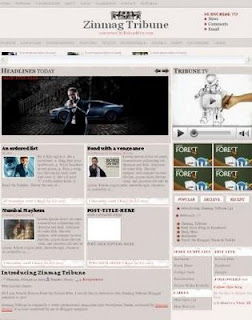
Are you magazine addicted? Here's the latest magazine style blogger template, adopted from Wordpress Theme, Zinmag Tribune. Another Jinsona's great design and converted to blogger by Alvaris Falcon. You can check another Zinmag series Zinmag Remedy, Zinmag Primus, Zinmag Forex, Zinmag Futura. More effort to set up magazine style, it's worth for elegant looks. Here's the straight shortcut to original source. Read instruction carefully.

zinmag tribune blogger template

Zinmag Futura

Jumat, 13 Februari 2009 | 0 komentar

Zinmag Futura, another Wordpress Theme designed by Jinsona, is now converted to Blogger Template by Cahaya Biru . Zinmag Futura Blogger Template fully magazine style, with slide featured similar to Zinmag Remedy and another Zinmag familiy. If you prefer to bright color magazine template than the dark one, Zinmag Futura is the right choice.

As you know, Magazine style blogger template consist of so many element. You must spent more time to learn how to setting up so many element. But do not worry, you can go to Converter's Blog to check installation setting and download it free. Get your best magazine look


Blogger Template : Zinmag Forex Press V 1.0

Rabu, 28 Januari 2009 | 0 komentar

Another professional theme is released, Forex Press V 1.0. Three column magazine style template adopted from wordpress theme and converted to blogger template by Cahaya Biru. This template has magazine look with featured post at the slide show and mainpost inline style.

At the sidebar, you can arrange and simplify widget using tabbed menu. As the name, Forex express has forex converter. We can choose currency that will be converted. Another featured is TV. This element can be replaced by video or another online media. This Forex Express Template suitable for business and money blog, embedded with advertising element containing 125x125 banner ads.


Click next link to go to converter blog and download it freely [link]

Zinmag Primus

Sabtu, 24 Januari 2009 | 0 komentar

The next family of zinmag has been released, Zinmag Primus Blogger Template. After Zinmag Remedy, now Alvaris Falcon release Zinmag Primus, another Wordpress theme designed by Jinsona Design.

Zinmag Primus is originally a professional and white elegant Wordpress theme, authored by Jinsona Design. It is later converted to Blogger template. Similar to Zinmag Remedy, this template has slide feature.

Zinmag Primus Blogger template is best viewed in following internet browser:

  • Internet Explorer 8
  • Opera 9.62
  • Firefox RC3
  • Google Chrome 0.3.154.9
Check out more great features and download these templates here, Blogger Template: Zinmag Primus!

Blogger Template : Zinmag Remedy

Selasa, 30 Desember 2008 | 0 komentar

Zinmag Remedy, this is a great template. A magazine style with professional look adopted from Wordpress theme and bloggerized by Falcon Hive. Zinmag Remedy template suitable for business blog and this is free, absolutely free. This is Zinmag Remedy's screenshot.


For setting and downloading, you can visit [here]


Template Specification

Template name: Zinmag Remedy
Template Author: Jinsona Design
Template Converter: Falcon Hive
Compatible BSP: Blogger
Possible Browser: Internet Explorer 8, Firefox RC3, Opera 9.6, Google Chrome 0.3.154.9
Validation: XHTML/ CSS
Column: 4
Gadget: Ready
Navigation Bar: Ready (2)
Search Bar: Ready
Welcome Message: No
Feature Content Section: Ready (3)
RSS: Ready (2)
Ads Space: Ready (3)
Video Space: Ready
Footer Gadget: Yes (4)
Feature: Dark professional magazine style design, Customizable double header navigation bar, Featured content section on the top and the side of the page.
 
Support : Free Blog Templates | Free GPRS lt
Copyright © 2012. Tutor | Blog™ - All Rights Reserved
Proudly powered by Free Blog Template
Contact @ FREE GPRS LT